One fixed list
Allergens are picked from a fixed list of 14, never typed in by hand, so every dish says the same thing in the same way.
Cravd shows the allergens in each dish on your digital menu, checked by your team. No scattered notes, no separate PDFs, and AI never makes safety decisions.
Try the allergen filter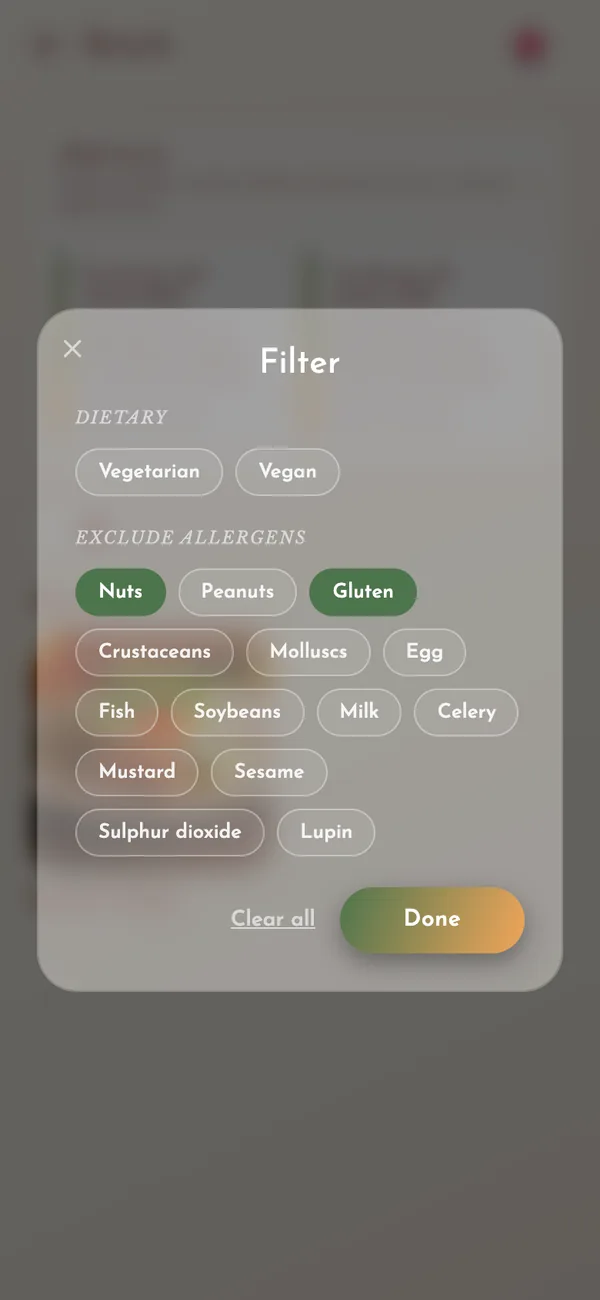
You choose which of the 14 allergens each dish contains, and a member of your team confirms it before the dish goes live. Guests tick the allergens they must avoid and the menu shows only the dishes without them. AI never decides what is safe.
Allergens are picked from a fixed list of 14, never typed in by hand, so every dish says the same thing in the same way.
A member of your team confirms the allergen information before a dish can go live.
Guests can open the allergen details on any dish screen before they add it to their order.
Keep your dishes looking beautiful while giving guests clear allergen information that you control.
The software helps. You stay in charge of what is true.
Your team adds the dish and ticks the allergens it contains.
A member of your team confirms the information before the dish can be published.
The confirmed information is shown on that dish everywhere it appears in the menu.
Guests can see the allergen information on the dish screen before they order.
A guest can remove an ingredient they do not like, such as onions. That is a cooking request, not a promise that the dish is safe for someone with an allergy. Cravd keeps the two apart, on the guest’s screen and in the kitchen.
UK food businesses must give accurate allergen information whenever food that is not pre-packed contains any of the 14 listed allergens. The Food Standards Agency recommends giving it in writing and also talking to the guest. Cravd helps you show your own information clearly. It does not replace staff training, kitchen procedures, official guidance or professional advice.
Your team can change a dish at any time. No reprinting menus or replacing PDFs.
Every language shows the same confirmed allergens, so nothing changes in translation.
The menu supports a conversation with trained staff. It does not replace it.
UK and EU law lists fourteen allergens. Each dish shows which of them it contains, always in the same way and in every language.
A guest ticks the allergens they must avoid. The menu then shows only the dishes without them.
Found a dish they like? They can still remove an ingredient they do not want before adding it to their order.
No tiny numbers to look up, and nobody has to remember a recipe change from three weeks ago. Taking an ingredient out is a request to the kitchen, not an allergy guarantee.
This is where many multilingual menus go wrong. If allergens are typed as ordinary text and then machine-translated, “nut-free” can come back meaning “nuts”. With safety information, even one mistake is too many.
It is a tool that attaches allergen information to each dish on your menu and shows it to guests in a clear, consistent way. In Cravd, you pick the allergens from a fixed list, your team confirms them, and they are shown separately from ingredients and cooking preferences.
No. The allergen information comes from you and must be confirmed by a person on your team before the dish goes live.
Yes. Guests can open the confirmed allergen information on the dish screen before they add the dish to their order.
No. Cravd gives you tools to show your own information clearly, but the business stays responsible for its allergen procedures and should follow current official guidance.
No. Removing an ingredient is a cooking preference. Allergen information is separate safety information that comes from a fixed list.
Yes. Each guest sees the allergens in their own language, and they always match what your team confirmed.
No. Cravd can send orders to your kitchen, and the restaurant keeps taking payment in its usual way.
Bring your current allergen details to a short demo and see how Cravd keeps them organised, visible to guests and under your team’s control.
Prefer email? info@cravdstudio.com
We reply within one working day, from info@cravdstudio.com.