Counted per dish
Views, adds, orders, units and revenue sit against the dish they belong to, not against the menu as a whole.
Cravd counts every menu view, dish view, add and sent order against the dish it belongs to, and reports it in your own portal. No guest account, no tracking pixel, no personal data.
Book a restaurant demo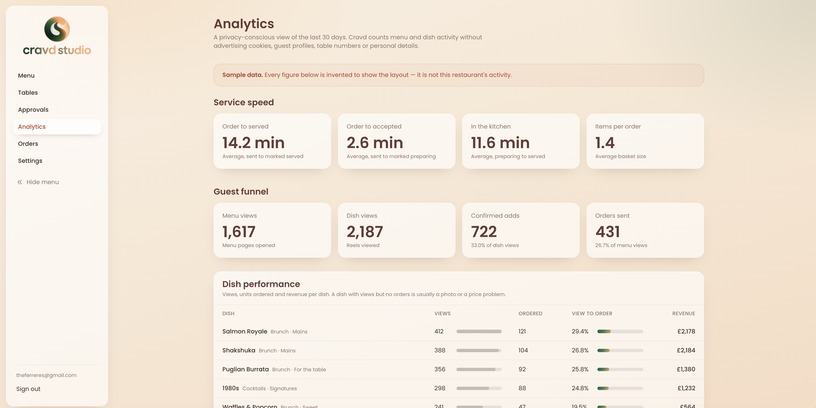
Restaurant menu analytics is the record of how guests actually move through a menu: what they looked at, what they added, and what they ordered. A printed menu reports none of it. Cravd records four events against each dish and shows them in a rolling 30-day view inside the restaurant's own portal.
Views, adds, orders, units and revenue sit against the dish they belong to, not against the menu as a whole.
The server works out which restaurant is asking from the signed-in session, never from anything the browser sends.
No account, no persistent browser id, no table number and no IP address is stored against an event.
Each step is a simple count, so the drop between two steps tells you where the menu is losing people.
A guest opens the menu from the QR code on the table.
A dish stays centred in the reel long enough to count as seen.
The guest confirms that dish into the order.
The order reaches the kitchen.
Three questions a paper menu can never answer about itself.
Views, adds, orders, units, revenue and a view-to-order rate per dish. A dish that is looked at constantly and ordered rarely stops hiding behind the ones that sell.
Orders counted by the language the guest actually used. A measure of the room on the night, rather than a guess from the booking system.
Units and revenue by category, with alcohol kept separate, because the drinks question is usually a different question from the food one.
Analytics that identifies guests is a liability, and a menu does not need it to be useful. The events are counts, and a count has no one attached to it.
No. The events are first-party counts with no identifier attached, so there is nothing in the guest menu to ask permission for.
No. Nothing stored identifies a person, a device or a table, so there is no individual to look up.
The portal shows a rolling 30-day view with daily totals.
No. Tracking is best effort and runs after the screen has loaded. If it fails, the guest never notices and the order still sends.
Bring your current menu to a short call and see the reporting run against your own dishes.
Prefer email? info@cravdstudio.com
We reply within one working day, from info@cravdstudio.com.